
Request Tracker
Built For Teams Who Need More Than Just a Helpdesk
Request Tracker is an open source ticketing system that teams of all sizes have used for more than 25 years to track requests, tasks, and workflows. RT is customizable and extendable, so you can see who is handling what, which tasks are in progress, and which work has the highest priority.

Introducing RT 6
RT 6 is the next generation of our open source ticketing system: powerful, flexible, and faster than ever. Designed for teams that need control without the bloat, RT 6 simplifies your workflows while scaling with your organization.
Key Features of Request Tracker

Seamless Email Integration
Request Tracker receives and manages all email sent to any of your key email addresses: support@, sales@, helpdesk@, security@, etc. Staff can manage ticket replies via email or by using RT’s full web interface.

Responsive Design
RT has a modern, responsive layout with all of the power and familiar features of RT. For developers familiar with Bootstrap, it is easy to customize RT’s UI or create your own themes using the Bootstrap toolkit as a base.

Easy to Build Charts
Take your reporting to the next level with our updated charting interface.

Workflow Builder
RT’s lifecycles feature enables you to create, manage, and automate workflows. RT includes a visual lifecycle configuration tool that you can use right in your browser.

Automation via Scrips and Actions
Every transaction on a ticket automatically triggers any configured Scrips. Conditions and Actions on each Scrip allow you to easily automate events in RT or other systems when key updates are made to tickets.

Scheduled Reports and Dashboards
RT’s drag-and-drop Dashboard editor keeps the reports and tasks that matter most in one place.

Knowledge Base
We call RT’s knowledge base feature Articles. Articles provide a way to create canned responses for answering frequently asked questions. Articles can be easily inserted into ticket replies or searched for in RT’s User Interface.

Inline Edit
Starting with your RT homepage, inline editing is now available for fields in ticket listings. Inline editing is also available on ticket display pages, search results and saved searches.

Dark Theme
RT includes a dark theme for people who prefer a darker interface.
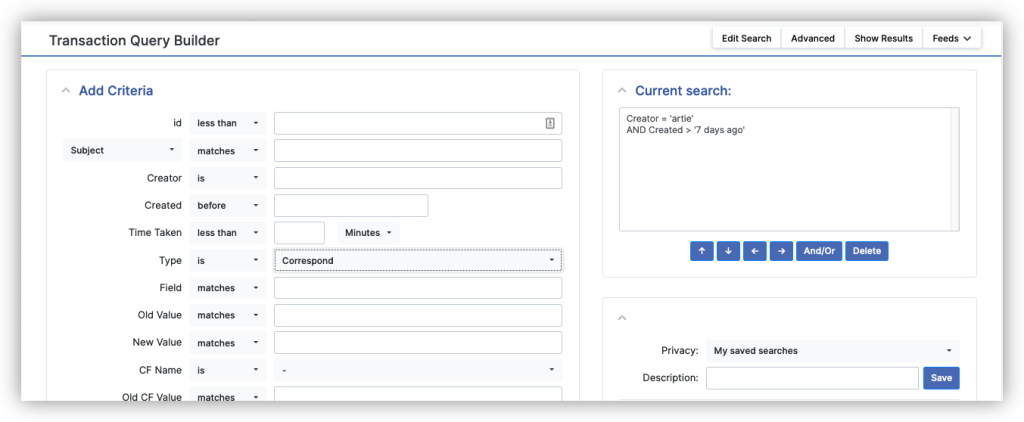
Transaction Query Builder
You can now search for individual transactions and get transaction information in search results. This allows you to do searches like “show me all the replies I sent this week” or “show me all of the changes to this custom field on this ticket” or even “show me how many replies were sent by everyone on the Support queue last week”.

RT Configuration in Web Admin UI
SuperUsers can now take advantage of hundreds of RT’s configuration options by making changes right in the browser. Changes, including updates to global settings, are applied immediately.

Tangible and Intangible Asset Management
Assets make it easy for you to track and manage all of the equipment or other kinds of assets you are responsible for within RT.
Even More Features…
Unlimited Custom Fields
Track additional data on every request
Custom roles and permissions
Create multiple roles on tickets and assets to associate users and groups
Unlimited customizable queues
Every queue supports custom lifecycles, user access rights, and other queue-specific configurations
Drag and drop attachments
Attach any separate files via the web interface or via email
Theme builder for branding
Change colors and the logo to match your company or create an entire Bootstrap theme
Email integration
Full support for incoming and outgoing communication on tickets via email
Time tracking
Built-in time estimated and worked on every ticket, and extended features in the free RT-Extension-TimeTracking
Ticket entry form builder
Create multi-page ticket creation wizards for RT
Fine-grained rights and access control levels
Grant users access to only tickets and queues related to their role
Change Management
Track changes with a dedicated queue or quickly get started with a full custom configuration in the free RT-Extension-ChangeManagement
REST 2 API + Zapier for Integrations
Use the RT REST API with tokens and JSON to integrate with other systems
Ticket automation
Define automation with scripts
Automated workflows
Create fully custom workflows with our Lifecycle editor
Data visualization with charts
Visualize data with the charts interface
Advanced reporting
Use the query builder to create detailed ticket searches
Knowledgebase for canned responses
Built-in articles store common responses for email and a searchable FAQ system
Asset management
Track all of the details for your IT assets in the same system as your support tickets
Full ticket audit trail
Every ticket update is tracked and viewable in the ticket history
Automated custom templates
Automatic replies to requestor upon ticket creation
General Data Protection Regulation (GDPR) support
Optional features to allow self-service users to see and remove their personal data
PGP and S/MIME support
Secure email connections with encryption support for incoming and outgoing email
Multilingual UI
Translated into 35+ languages
Command-line interface
Interface with RT in shell scripts or use the CLI for integrations with system tools
Over 400 freely available extensions
RT extensions offer extra features and functionality at no extra cost
Ticket tagging
Create custom fields to track tags or add the free RT-Extension-Tags for more features
Private internal notes (aka comments)
Reply (to end users) and comment (to internal team only) on any ticket
Scalable to handle any number of users and tickets
No built-in usage limits, just add hardware
Automatic notifications based on message or other ticket updates
Any action on a ticket can send a notification to whoever should receive it
RSS feeds
Track ticket activity with custom searches that can be consumed as RSS
Integration with Active Directory, SAML, and other authentication systems
Our flexibility is your flexibility
Predefined ticket actions
Every ticket has an Actions menu that you define in the Lifecycle
Multiple search options
Use the search bar to quickly find tickets, or the full Query Builder for detailed metadata searches
Full text searching
Search tickets for any words in the full history to find specific responses
Self-Service customer portal
Allow end-users to log in and view and reply to just their own tickets
WYSIWYG editor
Create HTML email replies with bold, italics, different font sizes and other formatting
Role based security
Set rights based on ticket Owner, Requestor, or custom roles you define
Report exports to .csv or excel
Export ticket data to spreadsheets for additional reporting or sharing
SLA management
Define and enforce Service Level Agreements (SLAs) by setting custom deadlines for ticket resolution based on priority, type, or other criteria
Business hours support for SLA
Tailor your SLAs to reflect your working hours
Rich message types
Full HTML email support for response and in templates
Scheduled reporting and dashboards
Deliver ticket reports directly to your inbox with scheduled dashboards
Scheduled tickets
Automatically create new tickets based on a schedule
Automatic ticket assignment: round-robin or based on ticket count
Set rules to automatically set the owner of incoming tickets
Incident management
Request Tracker for Incident Response (RTIR) provides custom queues and workflows for security teams
Full conversation history
Audit history of every change made to a ticket, listing all conversations and other ticket changes like status, showing who made the change and when
Approvals
Custom pages to allow users or groups to approve or deny new requests
Ticket escalations
Schedule automatic processes to send notifications or change rolls based on ticket details like the current due time
Chat
Have live chat sessions with other users directly on tickets and save transcripts on the ticket with the free RT-Extension-RocketChat
Satisfaction surveys
Accept end-user feedback and store the responses right on the associated support ticket with the free RT-Extension-Survey
Bulk actions for updating and editing tickets
Update multiple tickets at one time with Bulk Update, available from any set of search results
Ticket locking
Let other users know you are working on a ticket with the free RT-Extension-TicketLocking
Customizable ticket statuses
Custom Lifecycle designer supporting custom statuses, transitions, and rights
Ticket priority
Core priority field on every ticket with custom priority levels, as many as you need

Built for Scale. Backed by Community.
Request Tracker helps IT, support, and operations teams track, resolve, and automate tasks with full control and no vendor lock-in. Read the RT documentation.
Your Ticketing System, Your Way
Request Tracker makes it easy to manage tickets, tasks, and workflows, whether you’re supporting internal teams or external customers. Schedule a demo or start your free trial to see how RT adapts to the way you work.
Already using another tool? No problem. We can help you migrate your existing data and legacy information into RT.