
RT 6.0.3 is now available, and along with the usual round of fixes it brings some really nice upgrades to everyday search, a denser and more flexible custom field display, a button to easy switch the background color in ticket history, and a set of behind-the-scenes changes that make RT lighter on memory. Here’s a look at what’s new.
Smarter Simple Search: multi-word searches are now phrases
When you type or paste several words into the default RT search at the top of the page, you almost always have a specific phrase in mind. Searching for “error in login” should find tickets containing that phrase, not every ticket with “error,” and “in,” and “login” anywhere in the history.
RT 6.0.3 now treats multi-word searches like this as a search phrase, keeping all of the words together, which matches what most people expect and returns far more relevant results. Single-word searches behave exactly as before. Under the hood, phrase matching uses each database’s native capabilities, so you still get the fast results powered by the full-text search engine in your database.
This change is also a significant performance boost. The previous approach searched each word independently across Subject, Description, and Content and then combined them, which could generate a huge search with many words provided. That large search would use a bunch of system resources, and the results often were not what the user wanted. We think you’ll find the new default now does what you mean most of the time.
A denser, more responsive custom field display

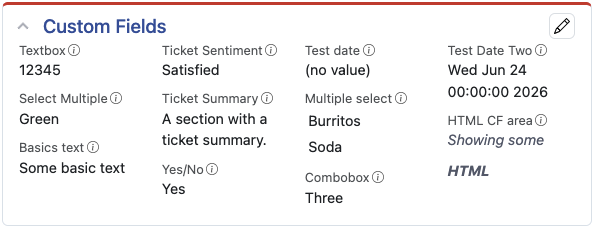
rather than a single long column
Custom fields on ticket and asset pages now make much better use of the space they have. Rather than stacking everything in a single tall list, RT arranges custom fields into multiple columns and automatically picks how many will fit. On a typical laptop you’ll often see three columns, so more information is visible at a glance without scrolling. As the available space shrinks — on a narrower page layout, a tablet, or a phone — the display smoothly steps down to two columns and then one, so it always stays easy to read.
Admins get new control here too. When configuring a page layout, you can now set how wide the custom field area should be, from extra narrow to extra wide, to pack in more or less information to suit your team. It’s a simple setting, with no theming or custom code required.
Toggle background contrast on hard-to-read messages
Email replies and comments sometimes arrive with inline styling that clashes with your RT theme. Light text baked into a message can become nearly invisible against a light background, and dark-on-dark is just as frustrating. It’s a small thing, but it comes up often enough to be a real annoyance.

RT 6.0.3 adds a toggle contrast button to each entry in the ticket history. With a single click on a create, reply, or comment transaction, RT swaps that message’s background between light and dark theme colors, instantly making the text readable again. There’s no configuration to set up and nothing to change globally, it’s a per-message flip you reach for only when you need it.
Lighter on memory
We have been keeping a close eye on performance and resource use on our managed RT instances. Using some of what we have seen, we’ve made RT more efficient with memory in some areas, especially on busy systems and when working with large amounts of data.
The biggest win comes from how RT handles user records. RT loads user information constantly, all over the application, often in places that don’t actually display anything on the page. Until now, every one of those loads also pulled along all data attached to the user, including their profile avatar. RT 6.0.3 holds off on loading that extra data until something genuinely needs it. Since a user’s avatar is normally cached by your browser after the first time you see it, there’s rarely any reason to fetch it again on the server side. We also saw very large sessions related to avatars, and these should now return to previous sizes.
Large ticket search result downloads are easier on the server now, too. When you export a big search to a spreadsheet, RT used to gather the data before sending it. RT 6.0.3 builds these results in batches instead, reducing the memory use for that request. The file you get is exactly the same, RT just assembles it more efficiently.
Administrators of systems with many configuration changes get a benefit too. The configuration history page in the web UI, which records every change made in the RT configuration, can build up a number of entries. That page is now paginated, so it loads quickly no matter how much history has accumulated.
A less twitchy menu
Finally, a fix for something you may have been annoyed by in 6.0.2: menus that closed on you just as you moved the mouse over to pick an item or open a submenu. We noticed it also and found a small timing bug in the menus from our switch over to using the Bootstrap menu library. In 6.0.3, menus now stay open while you navigate them, so you can move through to the option you actually want.
We’ve also made a bunch of improvements to accessibility, including keyboard navigation in menus, so you can arrow down to an item and then arrow right to open its submenu. Good accessibility and keyboard controls are great for all users.
Ready to upgrade? RT 6.0.3 is available now. Grab the latest release and review the release notes for everything that’s changed. As always, reach out if we can help with your upgrade.
Leave a Comment