
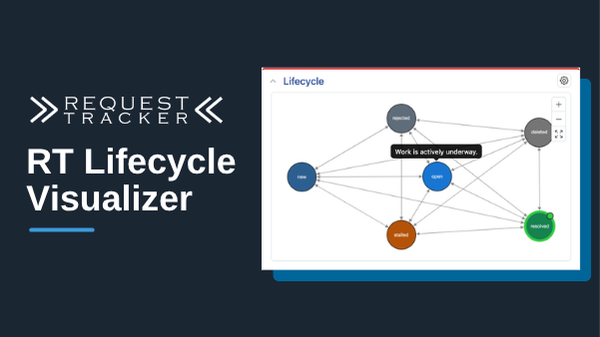
RT 6.0.4 has a new component that lets users fully visualize lifecycles on ticket and asset pages. It shows the full lifecycle with all statuses and transitions, so users can see all of their options at a glance and change status with a single click.
The core of every process is the workflow that defines the steps to get a task from created to completed. RT defines these with lifecycles. RT 6 introduced Page Layouts, giving you complete control over the display of your tickets and assets, and with that flexibility we’re adding new components that provide more options for different workflows. The lifecycle visualizer is one of them.
The visualizer clearly shows the current status in the context of the full lifecycle, and it’s interactive: users can change status by clicking the one they want, and hovering over a status or transition shows a description of the intended purpose for that part of the lifecycle. The RT administrator sets these descriptions in the lifecycle configuration, so new users can learn the workflow for a ticket or asset just by loading it.
In addition to the Description field that RT users see, there is an optional Notes field. This extra field is visible via the REST API and can give additional instructions to AI agents, helping them make the best decisions when they update tickets.
After upgrading RT, you can add the new lifecycle component by editing the page layout for the queue or catalog where you want to see it. Place it anywhere on the page, picking a size and location that will work best for that queue or catalog.
A couple of related improvements you’ll notice along the way: RT 6.0.3 added configurable colors to statuses, so if you haven’t set up colors yet, now is a good time. Once configured, the status display updates automatically everywhere it appears in RT. And when working on lifecycles, RT administrators will find a smoother experience in the new editor, based on the Cytoscape library.
RT 6.0.4 is available now, with automated upgrade steps from any previous version of RT. Plan your upgrade today, and if you’d like help with the upgrade, contact us to get started.
Leave a Comment