
For teams already running RT
What’s new in Request Tracker
If your RT was installed 5, 10 or 15 years ago, today’s RT will feel like a different product. Same tickets, queues and history you rely on, with a modern interface, flexible page layouts, built-in AI and much more. Here is what has changed since your version.
Think you know RT?
The RT you remember is not the RT you get today
RT has been around long enough that plenty of organizations still run installs that are 10 or 15 years old. If that is the version you have seen, here is what has changed.
Common misconceptions
The reality
“RT is legacy software.”
RT isn’t legacy. An old version of RT is. RT is actively developed, with a major release in 2025 and regular updates since, including built-in AI and the RT MCP Connector. Many teams installed RT years ago and never upgraded, so the version they still run feels like legacy software. Upgrade, and you get today’s RT.
“RT looks dated.”
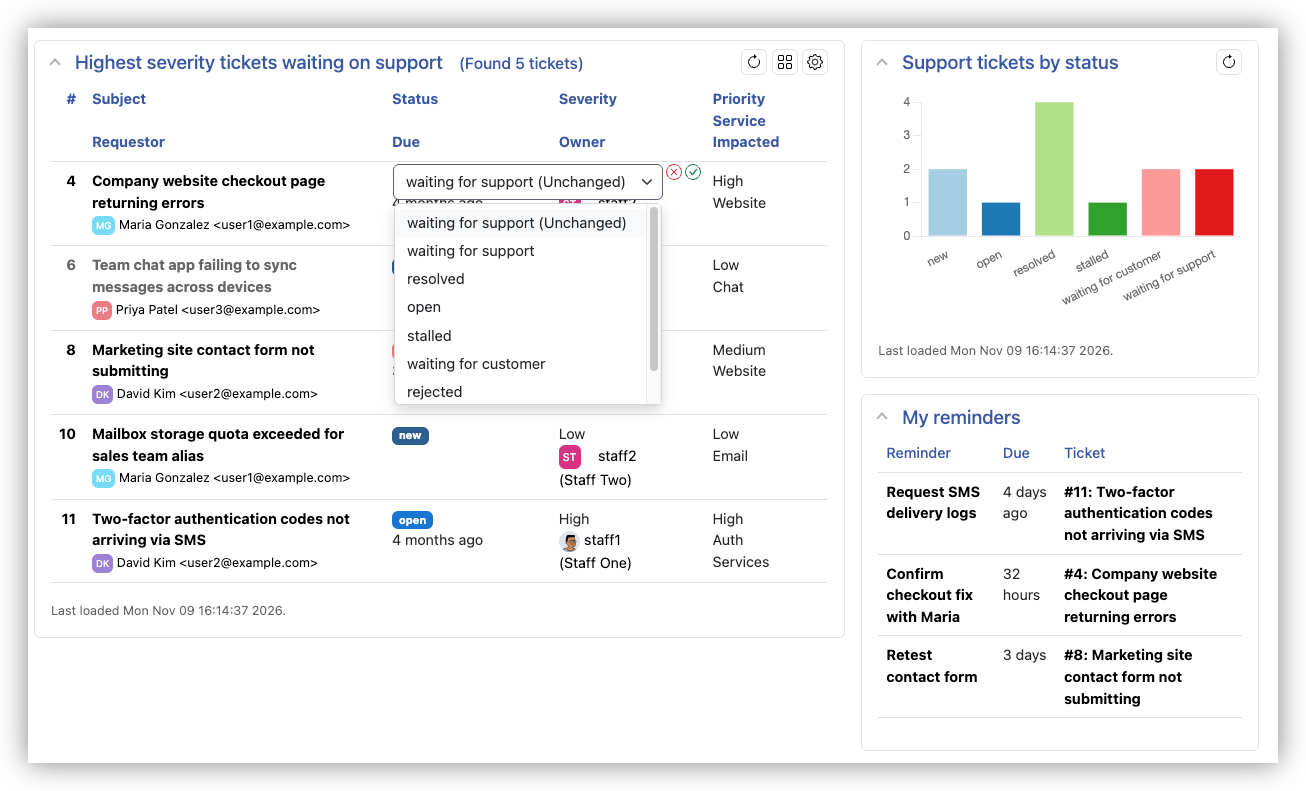
Today’s RT has a fast, modern interface. Fields edit in place, right in search results and dashboards, without reloading the page. Messages use a full rich text editor with drag-and-drop images. Page layouts let each team arrange its own ticket screens, and every user can switch to dark mode.
“RT doesn’t have AI.”
AI is built in and included on every plan at no extra cost. Suggested replies, ticket summaries, sentiment detection, routing suggestions, rewrite and translate, and similar-ticket lookup. You bring the model you trust, and the RT MCP Connector lets AI tools like Claude work tickets with the same permissions as any other user.
“Customizing RT means writing code.”
Most configuration happens in the browser. Build workflows in a visual lifecycle editor, add custom fields, design intake forms, set up SLAs and rearrange page layouts, all from the admin interface. Code is there if you want to go further, never required to get started.
“RT is hard to set up.”
A Cloud RT site is ready in about five minutes, preloaded with a working helpdesk configuration. We handle hosting, upgrades and backups. Prefer to run it yourself? We support that too.
“RT is just an IT helpdesk.”
RT tracks anything with a lifecycle. Customer support, security incidents, projects, approvals, HR onboarding, asset and contract renewals. Each team gets its own queue and process, all in one system.
What stays the same
Your RT, carried forward
Upgrading does not mean starting over. Your queues, tickets, full ticket history, email handling, saved searches, dashboards and permissions all come with you. Your team still replies to tickets the same way. It is just faster and easier to work in.
Security
Why staying current matters now
AI-assisted research is finding vulnerabilities in all kinds of software faster than ever. RT 6 is where fixes and new features land first, and staying current is one of the most effective ways to keep your system secure.
Compare versions
What you have, and what you are missing
Find your version in the columns below. Everything with a check in the RT 6 column is available to you after an upgrade.
Not sure which version you run? It is usually shown in small print at the bottom of every RT page, next to the Best Practical copyright line.
| Capability | RT 3.8Released 2008 | RT 4.0Released 2011 | RT 4.2Released 2013 | RT 4.4Released 2016 | RT 5Released 2020 | RT 6 (today)Released 2025 |
|---|---|---|---|---|---|---|
| Workflow and knowledge | ||||||
| Knowledge base (Articles) built in | – | ✓ | ✓ | ✓ | ✓ | ✓ |
| Custom statuses and workflows per queue | – | ✓ | ✓ | ✓ | ✓ | ✓ |
| Indexed full-text search of ticket content | – | ✓ | ✓ | ✓ | ✓ | ✓ |
| Track more than tickets | ||||||
| Asset management linked to tickets | – | – | – | ✓ | ✓ | ✓ |
| SLAs with business hours | – | – | – | ✓ | ✓ | ✓ |
| Custom roles (beyond Requestor, Owner and Cc) | – | – | – | ✓ | ✓ | ✓ |
| Ticket timers and time worked per person | – | – | – | ✓ | ✓ | ✓ |
| A modern, flexible interface | ||||||
| Responsive design that works on phones and tablets | – | – | – | – | ✓ | ✓ |
| Visual workflow (lifecycle) editor | – | – | – | – | ✓ | ✓ |
| Inline editing in search results | – | – | – | – | ✓ | ✓ |
| REST 2 API with JSON | – | – | – | – | ✓ | ✓ |
| System configuration in the browser | – | – | – | – | ✓ | ✓ |
| Page layouts per queue and catalog | – | – | – | – | – | ✓ |
| Pages that update in place, without reloading | – | – | – | – | – | ✓ |
| Rich text editor with pasted and dropped images | – | – | – | – | – | ✓ |
| Colored status badges | – | – | – | – | – | ✓ |
| Dark mode | – | – | – | – | – | ✓ |
| Ticket Description field | – | – | – | – | – | ✓ |
| Auto-refresh per saved search | – | – | – | – | – | ✓ |
| Charts included in emailed dashboards | – | – | – | – | – | ✓ |
| Automation rules (scrips) on assets | – | – | – | – | – | ✓ |
| Full-text search of custom fields | – | – | – | – | – | ✓ |
| AI suggested replies, summaries and routing | – | – | – | – | – | ✓ |
| RT MCP Connector for AI tools like Claude | – | – | – | – | – | ✓ |
Never fall behind again
Move to Cloud RT and stay current, automatically
The easiest way to stop running an old version is to let the team that builds RT run it for you. We move your tickets, history and configuration, then keep your RT up to date with every release.
- New features as soon as they ship, no upgrade projects
- Hosting, backups and monitoring handled for you
- Your data and configuration moved for you
- Built-in AI included on every plan
See it in action
Today’s RT, in short videos
Most videos run under ten minutes. Short on time? Start with the full tour, or pick the feature you care about.
The full tour: What’s New in RT 6
About an hour of live demonstrations covering every major change.


Pages that update in place
Opening tickets, updating fields, replying and searching all happen without reloading the page.

Page layouts
Arrange ticket and asset pages by queue or request type, without writing code.

A refreshed look
A cleaner interface with colored status badges you can read at a glance.

New reply and comment editor
Full rich text, with images pasted or dropped straight into the message.

Ticket Description field
Keep the current summary of a request where a teammate will see it first.

Auto-refresh per saved search
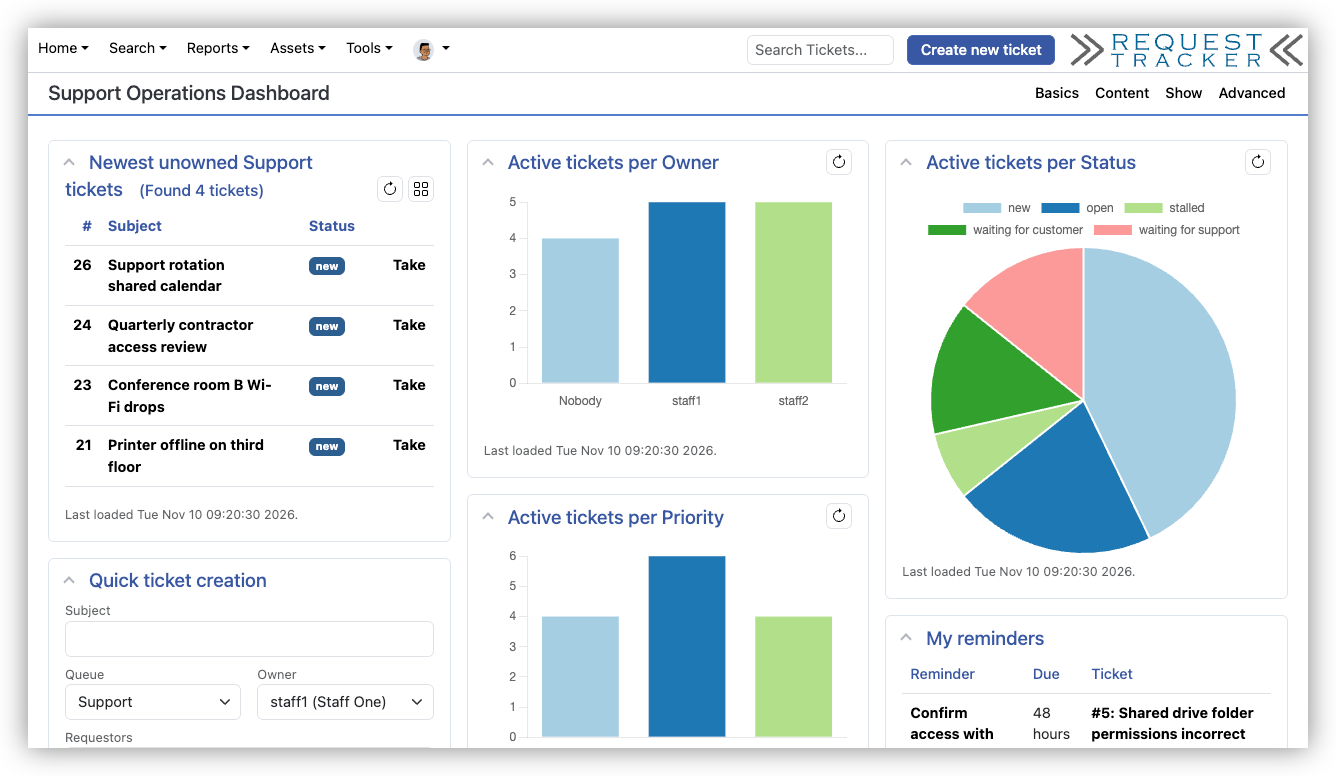
Refresh the unowned-tickets list every minute and leave the monthly report alone.

Quick Create
Log a ticket from your home page, with custom fields, without leaving the page.
AI in RT
Suggested replies, summaries and routing with the AI model you choose, plus the MCP Connector for AI tools like Claude.
More on the What’s New in RT blog, including the latest point releases, and on our YouTube channel.
Compare
See how RT stacks up
Side-by-side comparisons with the ticketing systems teams most often weigh against RT, covering price, AI, customization and where you can run it.
Every feature
Explore everything RT can do
The full list of RT features and extensions, each with a short description, so you can see exactly what today’s RT includes.
Your path forward
Three ways to get to today’s RT
Upgrade with our help
Our engineers plan and perform the upgrade with your team, working from your existing configuration and customizations.
Move to Cloud RT
Let the team that builds RT run it for you. We help move your data and configuration, then handle upgrades, backups and monitoring from there.
Get your team up to speed
RT 6 training covers users, administrators, system administrators, RTIR, integration and automation, and development, with private sessions for teams.
Ready to see what you have been missing?
Tell us which version you run today and we will map out your path to the current release. Or start a free trial and explore today’s RT for yourself.