
Everyone’s trying to figure out where AI assistants fit into their work. The hype phase is over. Now it’s about finding the spots where they genuinely help, where they save time, reduce friction, or surface something you would have missed. What’s becoming clear is that the AI itself is only part of the equation. The bigger factor is what data it can access.
That’s why your system of record matters so much. The data that drives your organization, the open requests, the pending approvals, the overdue tasks, the things waiting on someone, needs to live somewhere reliable, structured, and accessible. That’s exactly what Request Tracker is built to be.
RT is your operational system of record. It captures what was requested, who requested it, what’s been done, who’s responsible, and what the current status is. It’s the connective tissue of how your team gets work done. And now, with the RT MCP connector, it’s also the data source that makes your AI assistant genuinely useful.
Your Ticket Data, Transformed into Insight
We’ve published a new open-source tool that connects AI tools like Claude directly to your Request Tracker instance. The result is an AI assistant that doesn’t just reason in the abstract. It knows what’s actually happening in your organization, because it’s reading directly from the system where that work lives.
With tools like Claude connected to RT, your ticket data doesn’t just sit in queues waiting to be found. It becomes insight. It becomes a meeting agenda. It becomes an executive briefing. It becomes a risk summary that’s ready when you need it.
What Does That Look Like in Practice?
Here are a few scenarios that show the value right away.
Get an operational overview, instantly
Imagine starting your morning by asking:
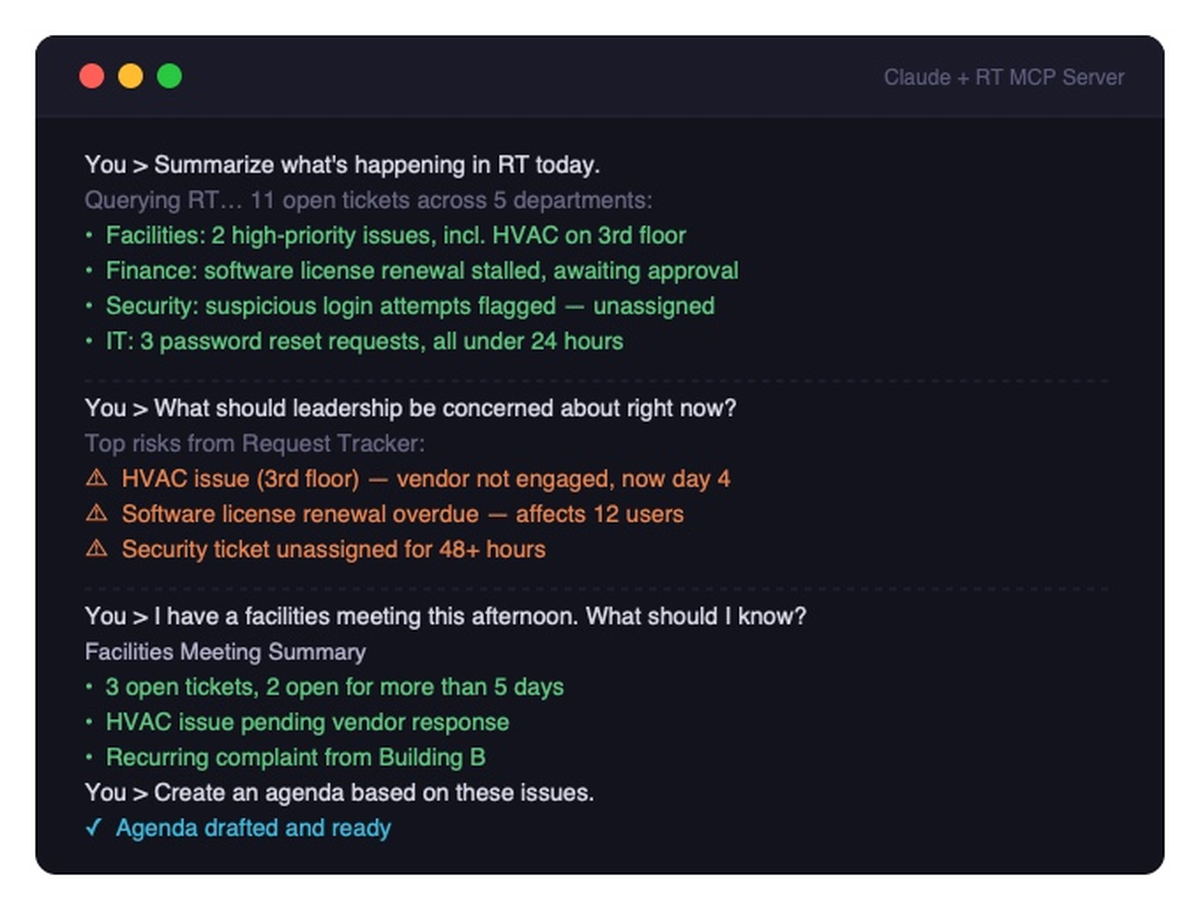
“What’s open across all queues today? Anything high priority or overdue?”
Claude reviews your queues and responds with something like:
- 11 open tickets across 4 departments
- Facilities has two high-priority issues, including an HVAC problem on the 3rd floor that’s been open for 5 days
- Finance has a stalled software license renewal that’s been waiting on approval for 3 days
- IT Operations has a vendor access issue blocking active work
That’s a quick, clear picture of where things stand, drawn directly from the data already in RT.
Prepare for a meeting in seconds
Before your weekly facilities meeting, you could ask:
“What’s active in the Facilities queue? Anything I should flag for the meeting?”
Claude responds with a summary of open tickets, how long they’ve been open, and where things are stuck. Then:
“Can you draft a quick agenda based on those issues?”
In about 30 seconds, you go from “I have a meeting later” to walking in with a prepared agenda, all based on real, live data from Request Tracker.
Surface what’s actually at risk
One of the most useful things you can ask:
“Based on what’s in Request Tracker, what should I be paying attention to right now?”
Claude can read across your queues, identify stalled or overdue tickets, understand their context, and summarize the risks in plain English. That’s the kind of analysis that normally takes real time to pull together manually.
Create and update tickets in the same conversation
The connector isn’t just for reading. You can take action directly from Claude:
“Create a facilities ticket for a broken coffee machine in the main kitchen, medium priority, assigned to the Facilities team.”
Claude creates the ticket. You stay in the conversation.
RT as the Hub: Working Across Your Tools
One of the most powerful things about the RT MCP connector is what happens when Claude can see RT alongside the other tools you use every day.
RT is your system of record. But work doesn’t live in RT alone. Meetings are in your calendar. Conversations are in Slack. Notes and documents are in Notion. When Claude can connect those dots, the results feel genuinely different.
A few examples of what that can look like:
RT and your calendar. Ask Claude: “Do any of my meetings today involve projects with open RT tickets?” Claude checks both, and can brief you on the relevant tickets before you walk into the room.
RT and Slack. Ask Claude: “Draft a Slack message to the Facilities team about the two overdue tickets.” Claude pulls the ticket details from RT and writes the message. You send it.
RT and Notion. Ask Claude: “Summarize the open IT tickets and add them to my team’s weekly notes page in Notion.” Claude reads RT, writes the summary, and updates the page.
The thread running through all of these is the same: RT is where the work is tracked, and Claude is what makes that data useful across everything else you’re doing.
Who Is This For?
The RT MCP connector is valuable for anyone who relies on Request Tracker and wants a faster, more conversational way to work with their data. That includes:
- Managers and department heads who want a quick read on queue health without running reports
- Operations staff who coordinate across multiple teams and need the full picture fast
- Executives who want operational awareness in plain English
- Anyone who works across tools, because Claude can bring RT data together with information from your calendar, Slack, Notion, and more
And for teams that want to go further, Claude can also run these checks on a schedule, delivering automatic daily briefings, overdue ticket alerts, or pre-meeting summaries without anyone needing to ask.
Ready to Get Started?
To set up the RT MCP server, check out our earlier post which covers everything you need, including a video walkthrough.
We’d love to hear how you’re thinking about using the connector. If you have questions or want to explore how RT and AI can work together in your organization, get in touch. We’re happy to help you figure out the best way to put your RT data to work.
Leave a Comment