
You have started working with AI agents, and they are genuinely useful. They draft, they research, they take a first pass at work that used to sit in a queue for weeks. For your personal tasks, it can feel like magic.
Then, as you tackle more tasks with your new AI assistant, you run into a familiar set of challenges. The agents work, but you need to keep track of what they are doing, align your tasks with their tasks, and somehow you need to communicate all of this with the rest of your team.
How do you transition from the personal, desktop workflow to a team workflow?
You need a clear record of what your agents are doing, for you and for the agent. An agent starts every session with an empty context. It does not remember yesterday. So the memory of the work has to live somewhere durable, something that holds state, records who did what, and can be read back by you and the agent. Without that, “what did the agent actually do” can be a mystery.
You need to integrate agents into your workflows, alongside normal staff work. Agents do not work in a vacuum. Their drafts get reviewed by people, their questions go to your dev team, their output has to clear a human gate before it goes out into the world. You need one workflow where an agent and a person can hand work back and forth without a translation layer in between.
You need to manage the agents’ backlog. Agents can move through a lot of work, but someone still has to hold the backlog: set priorities, assign the next item, see what is in flight and what is stuck. At first you did this manually, but now you want to scale up and add some automation.
You need to give everyone on the team visibility. The whole team should be able to see what the agents are doing without having to ask: who holds a piece of work right now, what state it is in, what has happened to it. If that only lives inside an agent’s context or a private transcript, nobody else can see it.
These are coordination challenges, and RT was built for them
When we look at that list, it feels very familiar. A clear record, shared workflows, a managed backlog, visibility for everyone that doesn’t live on your desktop. These are the same challenges you get coordinating work across multiple people and multiple departments, with handoffs between them. That is exactly what Request Tracker was built to handle: coordination, communication, and tracking.
Which is why, when we started pointing agents at real work, RT already did most of what we needed. We gave each agent its own RT account and let the ticketing system do what it has always done.
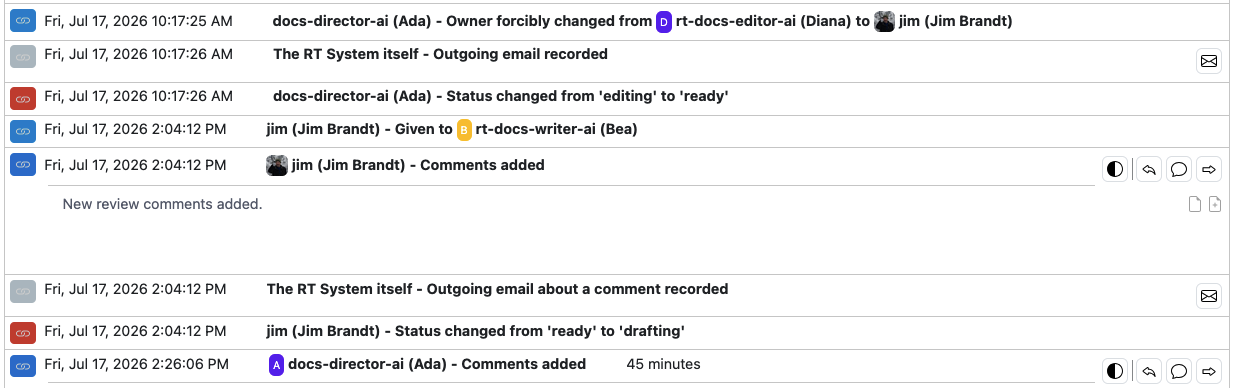
Give an agent its own account and the four challenges mostly answer themselves. The record you wanted is just RT history: every status change, owner change, and comment is a timestamped transaction on the ticket, so “what did the agent do” is something you read back, not something you reconstruct. And when the agent wakes up and needs to continue, it can read through this history to load back all of the context.
Integrating agents with staff work is setting Owner on a ticket, just like you would with a member of your team. Rights can gate what the agent can do, and when they are done, they update Status and Owner to the next person in the workflow (which could be another agent). The agent backlog can be the standard “Highest priority tickets I own”. And anyone on the team can see the current status and receive updates from RT as agents do their work.
This isn’t new features added for AI. It is just how RT works.
How it works in real life
Here’s an example of how we have implemented this in our RT development environment. Every development team has a documentation backlog it never reaches: the pages that would help, that nobody has time to write. We’re no different, so we created a small documentation department of AI agents to evaluate gaps in the RT docs and start working on them.
The team is small and each AI agent role is narrowly scoped. One agent, Ada, directs the department and sets priorities. Others draft, edit, and prepare screenshots. A person reviews and approves the backlog before any work is done. A staff member also reviews drafts and ultimately handles final commits of completed docs. This new process has allowed us to finally move on documentation tickets that had been waiting for years, with RT keeping every handoff between those roles honest. Two weeks in, the first new documentation was merged into RT.
Because Ada starts each session with an empty context, their session ritual is to rebuild it from RT: read the handbook, read the backlog, skim the repository log, pull the latest status report, review the open tickets, then start. The agent forgets. RT does not. A chat transcript does not survive a fresh context in usable form. A ticket does.
The rights configuration earned its place early. During the first round of review, one agent tried to hand a ticket to another agent, and RT refused: that account had no right to own tickets in that queue. The agent did the right thing, posting a comment that recorded what they were trying to do, the denial message, then flagging it for a human instead of routing around it. An admin granted the right the next morning and the handoff went through. RT stopped an unauthorized handoff and left the whole exchange on the record.
The history piles up on the ticket where you can use it. The first page we shipped took thirteen owner changes and sixteen status changes as it cycled through the writing and review process. One thing we did not even design: the agents file status reports as tickets with the report attached as markdown, and RT versions the attachment when an updated copy goes up under the same name, so we got revision history for free. This also solved a problem we had with agents wanting to write notes in local files to record changes. It stopped when we updated the agent instructions, explaining that all of the history was recoverable on the ticket.
The workflow also supports a review cycle to catch errors and improve drafts at every step. The first version is created by a writing agent. An editing agent reviews them and makes updates, or returns drafts for rework when needed. Staff reviewers then get the draft after this cycle is complete and Ada has done a final review. That is the workflow doing its job, and it lends itself well to AI integration. Having one AI agent review the work of another is a helpful pattern for improving their work product, and RT manages it with standard owner and status changes on a ticket.
Start where you are
As we are learning about what AI can do, we start with individual tests, usually manually driving AI agents through tasks. When the task is defined and working, we then need a way to move it from our desktop to the full team, and RT is the natural way to do it.
And you can do it too. You have the full toolkit in RT already with your existing queues and lifecycles, and it’s easy to create new ones to keep the new testing separate if needed. If you’re on newer versions of RT, you can use the RT MCP to interact with your RT. We have found AI agents can also use the REST API 2.0 if you point them at the docs.
Already integrating AI into your RT workflows? We’d love to hear more about it. Head over to our forum and add a new topic describing what’s working and what’s still a challenge.
Leave a Comment